AI content workflow for WordPress publishers
A WordPress publishing workflow for using AI responsibly across briefs, drafts, editing, metadata, schema, and internal links.
Introduction
A publishing workflow needs quality gates.
WordPress makes publishing easy. AI makes drafting fast. That combination can help or hurt depending on whether the publisher has a workflow.
The goal is to move from idea to published page with clear checkpoints for intent, structure, usefulness, links, metadata, and review.
Why this matters
Publishing speed without process creates cleanup.
AI can create more drafts than a team can review. Without a workflow, weak pages accumulate and become harder to maintain.
A repeatable workflow keeps every article moving through the same editorial checks.
Core problem
WordPress AI workflows often skip review.
The common failure is treating AI output as publish-ready. Even good drafts can contain unsupported claims, shallow examples, missing links, or poor formatting.
Review needs to be part of the workflow, not an afterthought.
Workflow
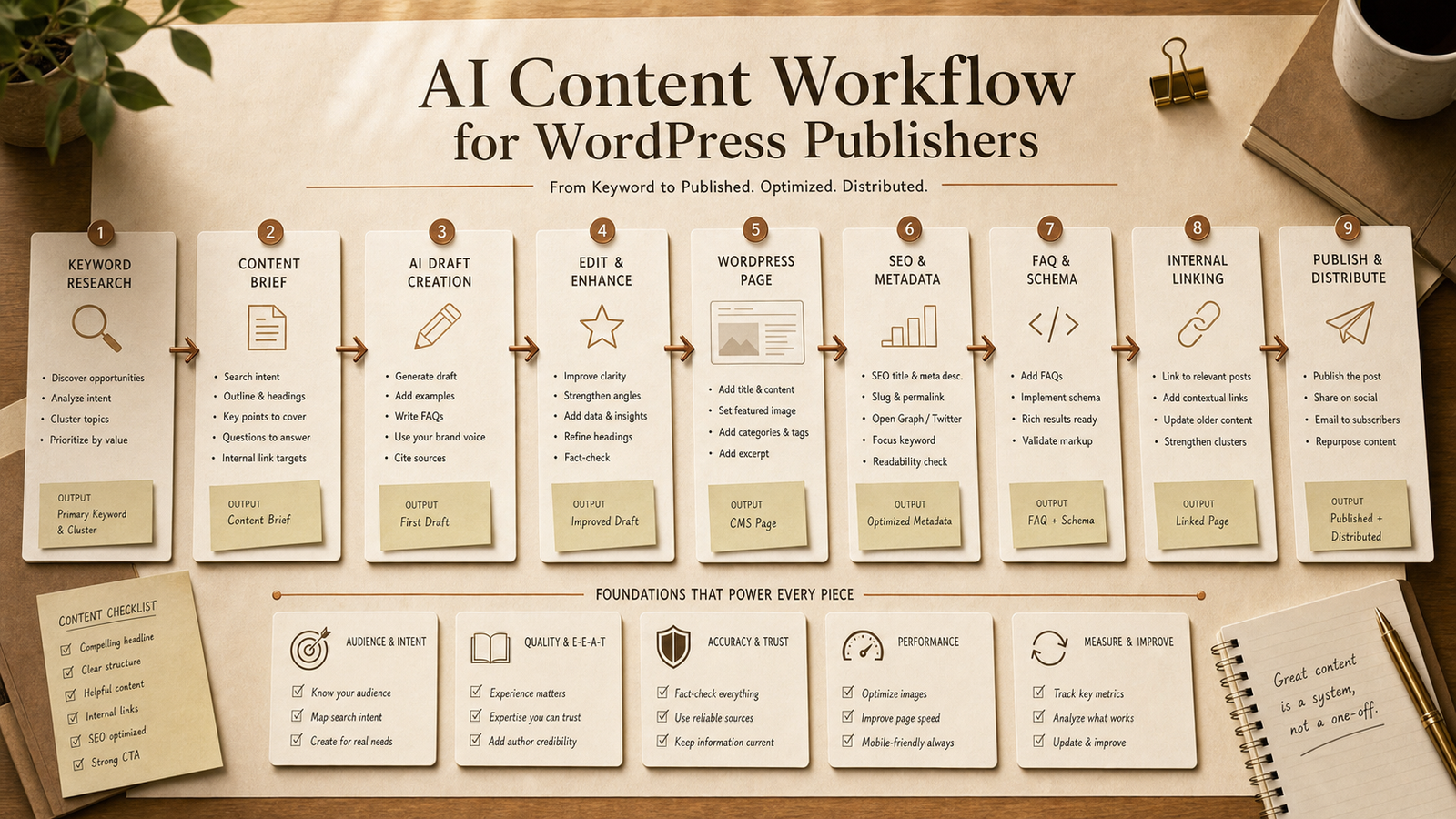
A practical WordPress AI workflow.
Use a staged workflow for every article.
Keyword and intent: define the page job and reader problem.
Brief: create sections, examples, internal links, and verification needs.
Draft: generate one section at a time with constraints.
Edit: improve clarity, specificity, transitions, and examples.
SEO layer: add title, description, FAQs, schema notes, and internal links.
Publish QA: check formatting, links, facts, media, and final reader value.
Example prompt
WordPress publisher workflow prompt.
Use this prompt after choosing a keyword or topic.
Copy-ready prompt
Act as a WordPress SEO managing editor. Build a publishing workflow for [TOPIC]. Include search intent, reader problem, article brief, section draft plan, internal links, metadata, FAQ candidates, schema notes, WordPress formatting checks, and human review steps. Do not invent facts or claim guaranteed rankings.
Practical use case
Publishing an AI SEO guide.
For an AI SEO guide, the workflow might produce a brief, draft examples, internal links to prompts and resources, FAQ schema candidates, and a final review checklist.
The WordPress editor then verifies the claims, adds screenshots or examples where appropriate, and publishes only after QA.
Tools needed
Keep the stack lightweight.
You need WordPress, an AI assistant, a prompt library, a content checklist, and a way to track internal links.
NEOA provides the free prompt and skill resources that can support the AI part of the workflow during beta.
Mistakes to avoid
Avoid generic AI publishing habits.
Do not reuse the same intro pattern across many posts. Do not publish claims without checking them. Do not add FAQs that are not useful to the reader.
Also avoid internal links that are added only for SEO. Links should help the reader continue the workflow.
Recommended NEOA resource
Use free beta resources as workflow pieces.
Use NEOA prompts for briefs, the SEO Content Agent for structured writing, and the SEO Agent Skill Pack for repeatable publishing tasks.
Create a free account if you want to save prompts and downloads to your dashboard.
Detailed workflow
Use AI across the publishing pipeline.
WordPress publishers need a pipeline, not a pile of drafts. Each stage should have a clear output and a human review point.
This workflow keeps AI useful while protecting publishing quality.
Planning: choose topic, reader, intent, page promise, and internal link targets.
Briefing: create the outline, examples, source needs, FAQ ideas, and metadata direction.
Drafting: generate one section at a time with specific examples and constraints.
Editing: remove generic phrasing, add practical details, and check unsupported claims.
WordPress prep: format headings, excerpts, image alt text, categories, internal links, and FAQ blocks.
Distribution: turn the article into newsletter notes, social posts, and resource links without changing the core claim.
QA: verify facts, links, schema, readability, and final next-step CTA before publishing.
Improved prompt
WordPress publishing workflow prompt.
Use this before creating a draft in WordPress.
Copy-ready prompt
Act as a WordPress SEO managing editor. Build a publishing workflow for [TOPIC] aimed at [AUDIENCE]. Include search intent, article promise, brief, section draft plan, examples, internal links from [APPROVED URL LIST], metadata, FAQ candidates, schema notes, WordPress formatting checks, repurposing ideas, and human QA. Do not invent facts, do not claim guaranteed rankings, and do not produce a final draft until the brief is approved.
Checklist
WordPress publisher QA checklist.
Use this before pressing publish.
The article has a clear reader problem and does not start with generic filler.
Every AI-assisted claim that needs verification has been checked.
Internal links help the reader continue to prompts, skills, resources, or tools.
FAQ content is visible on the page before schema is added.
The featured image has descriptive alt text.
The final CTA uses clear free beta language.
NEOA workflow
Use this AI content workflow for WordPress publishers guide inside the AI SEO hub.
Treat "AI content workflow for WordPress publishers" as one part of the broader NEOA AI SEO workflow. Start from the hub when you need the surrounding topic cluster, then adapt the prompt, run the SEO Content Agent, and save the free resource for repeatable use.
Open the AI SEO hub to see where this guide fits in the full keyword-to-refresh cycle.
Use the Prompt Library or Prompt Generator to adapt the example prompt for your site and audience.
Use the SEO Content Agent and free SEO Agent Skill Pack when the workflow should become repeatable.
Keep the final output human-reviewed before publishing, refreshing, or adding structured data.
Related agent skill
SEO Content Agent Skill
A structured agent skill for turning a keyword into a full SEO content brief, article outline, metadata, FAQ schema plan, and social distribution assets.
Free NEOA resource
Download the free NEOA SEO Agent Skill Pack
Use the free beta pack to structure briefs, refreshes, FAQs, internal links, and WordPress SEO review workflows.
View resourceFree prompt pack
Get the prompt pack behind practical AI workflows.
Download 50 prompts for SEO, content, research, and business automation, then use them with this guide to make the workflow repeatable.
Free download
Get the prompt pack.
Choose your main interest and unlock the Markdown download.
Free during NEOA beta. You can download after submitting the form.
FAQ
Common questions
Can WordPress publishers use AI safely?
Yes, when AI is part of a reviewed workflow. It should support planning, drafting, and editing rather than bypass publication standards.
Should AI content be auto-published?
For most publishers, no. Human review should check accuracy, usefulness, formatting, links, and brand fit before publishing.
What is the best first workflow to build?
Start with an article brief workflow because it improves every later step in the publishing process.
Where should AI fit in a WordPress publishing workflow?
AI is most useful in briefs, section drafts, editing passes, metadata, FAQ planning, internal links, and repurposing. Human review should still control publishing.
What should WordPress publishers check before publishing AI-assisted content?
Check accuracy, examples, internal links, formatting, image alt text, visible FAQs, schema, and whether the article gives a clear next step.
Final recommendation
Make the workflow repeatable before you scale it.
Treat AI as an editorial operations layer for WordPress, not as a replacement for publishing standards.